Configuration
This page describes configuring the Windows version of Hermes and applies
only to Build 30.
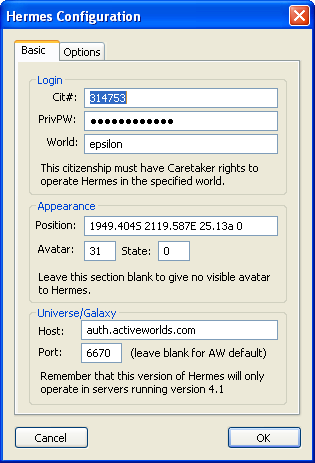
Basic Settings
Login
- Cit#
- Citizen number used to operate Hermes.
- PrivPW
- Privilege password for above citizen. (NOT THE ACCOUNT/LOGIN PASSWORD)
- World
- Name of world where Hermes is to be operated.
Appearance
This section is optional. To prevent Hermes from having an in-world visible
avatar, leave the Position field blank.
- Position
- Coordinates where Hermes' avatar will appear. Leave blank to disable this.
- Avatar
- The avatar number for Hermes to use.
- State
- One of several values:
| 0 |
Walking |
| 1 |
Running |
| 2 |
Flying |
| 3 |
Swimming |
| 4 |
Falling |
| 5 |
Jumping |
| 6 |
Warping |
Universe/Galaxy
Introduced in Hermes build 27.
Specifies the host and port of the universe Hermes should connect to. Leave
these fields blank to connect to the default AW universe.
Options
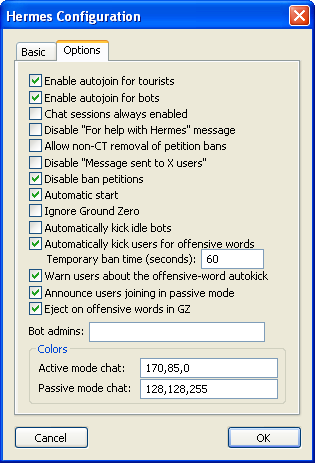
- Enable autojoin for tourists
- Allow the autojoin function to be available to tourists.
- Enable autojoin for bots
- Allow the autojoin function to be available to bots.
- Chat sessions always enabled
- Automatically activate chat sessions for all users entering the world.
- Disable "For help with Hermes" message
- Disable help message after joining the extended chat network.
- Allow non-CT removal of petition bans
- Allow users with eject rights to remove bans which were created by user
petition. (Otherwise, only users on the same PPW as Hermes can remove these
bans.)
- Disable "Message sent to X users"
- Turns off the message after using h::.
- Disable ban petitions
- Completely disable the user petition system.
- Automatic start
- Automatically start Hermes.
- Ignore Ground Zero
- Ignore chat in the immediate 200m area of the world's entry point (where
"Ground Zero" is 0N 0W, or as specified in the world's
Entry Point attribute.)
- Automatically kick idle bots
- Bots that join the network but do not speak within 30 seconds will be kicked
off.
- Automatically kick users for offensive words
- Users who use words in the censor will be kicked and temporarily banned
for 60 seconds (or as specified in Temporary Ban Time)
- Warn users about the offensive word autokick
- When enabled with the option above, a message is sent to the user regarding
the automatic kick.
- Announce users joining in passive mode
- Users joining or leaving the network in passive mode
will be announced.
- Eject on offensive words in GZ
- Automatically eject users in the GZ area for offensive language.
- Bot admins
- List of citizens to be considered as bot administrators.